
The current state of AI-assisted development
What coding agents do well today, the working method that makes them dependable, and how a team takes over an app built this way. Every quoted figure links to its source.
Where things stand
From autocomplete to agents that finish tasks
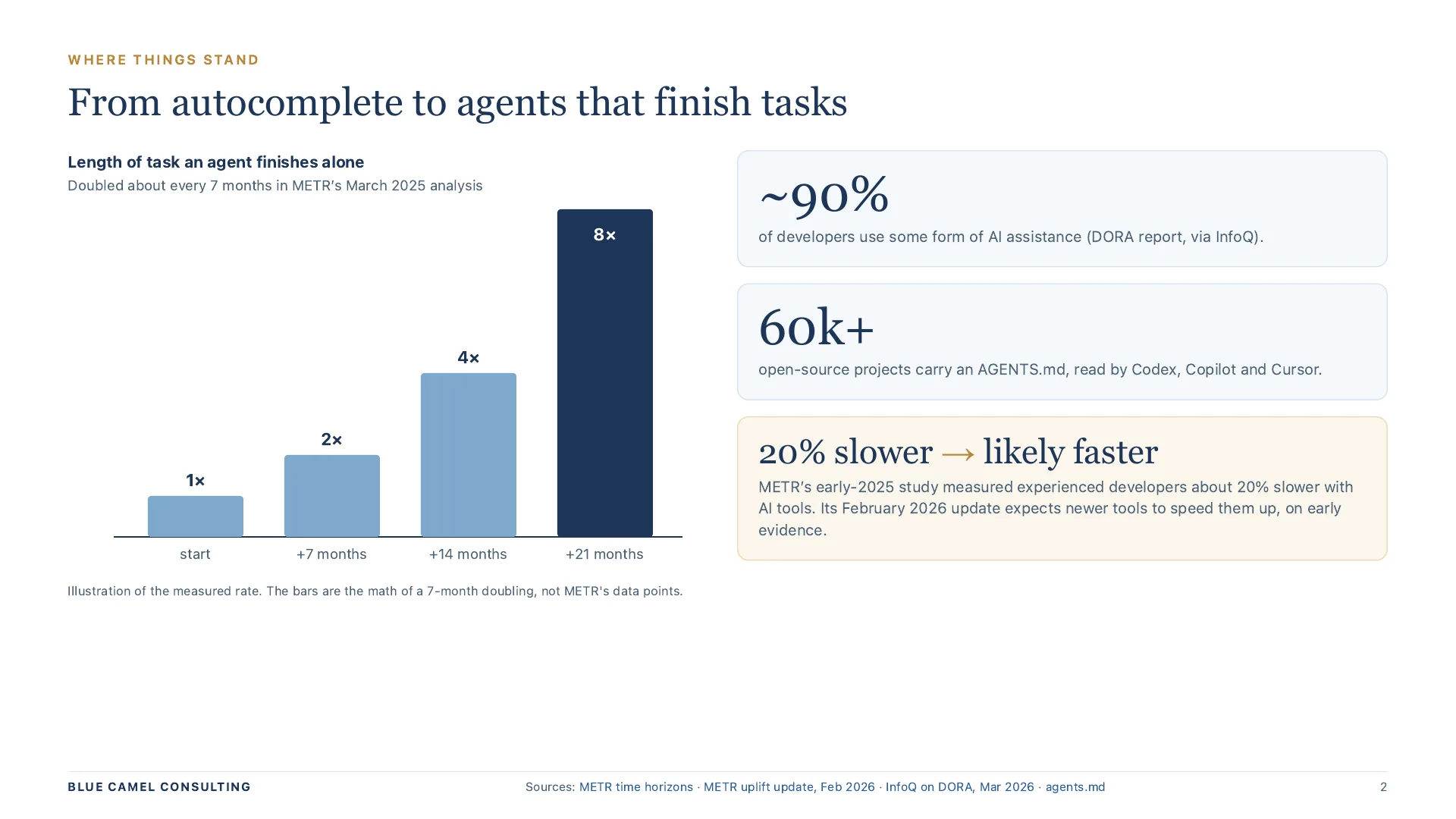
Doubled about every 7 months in METR’s March 2025 analysis.
Illustration of that rate. The bars are the math of a 7-month doubling, not METR’s data points. METR publishes later estimates on its time horizons page.
- 1×: start
- 2×: +7 months
- 4×: +14 months
- 8×: +21 months
- ~90% of developers report using some form of AI assistance (DORA report, as covered by InfoQ).
- 60k+ open-source projects carry an AGENTS.md, read by Codex, Copilot and Cursor.
- 20% slower, then likely faster METR’s early-2025 study measured experienced developers about 20% slower with AI tools. Its February 2026 update expects newer tools to speed them up, on early evidence.
What an agent does
A loop of small steps, each one checkable
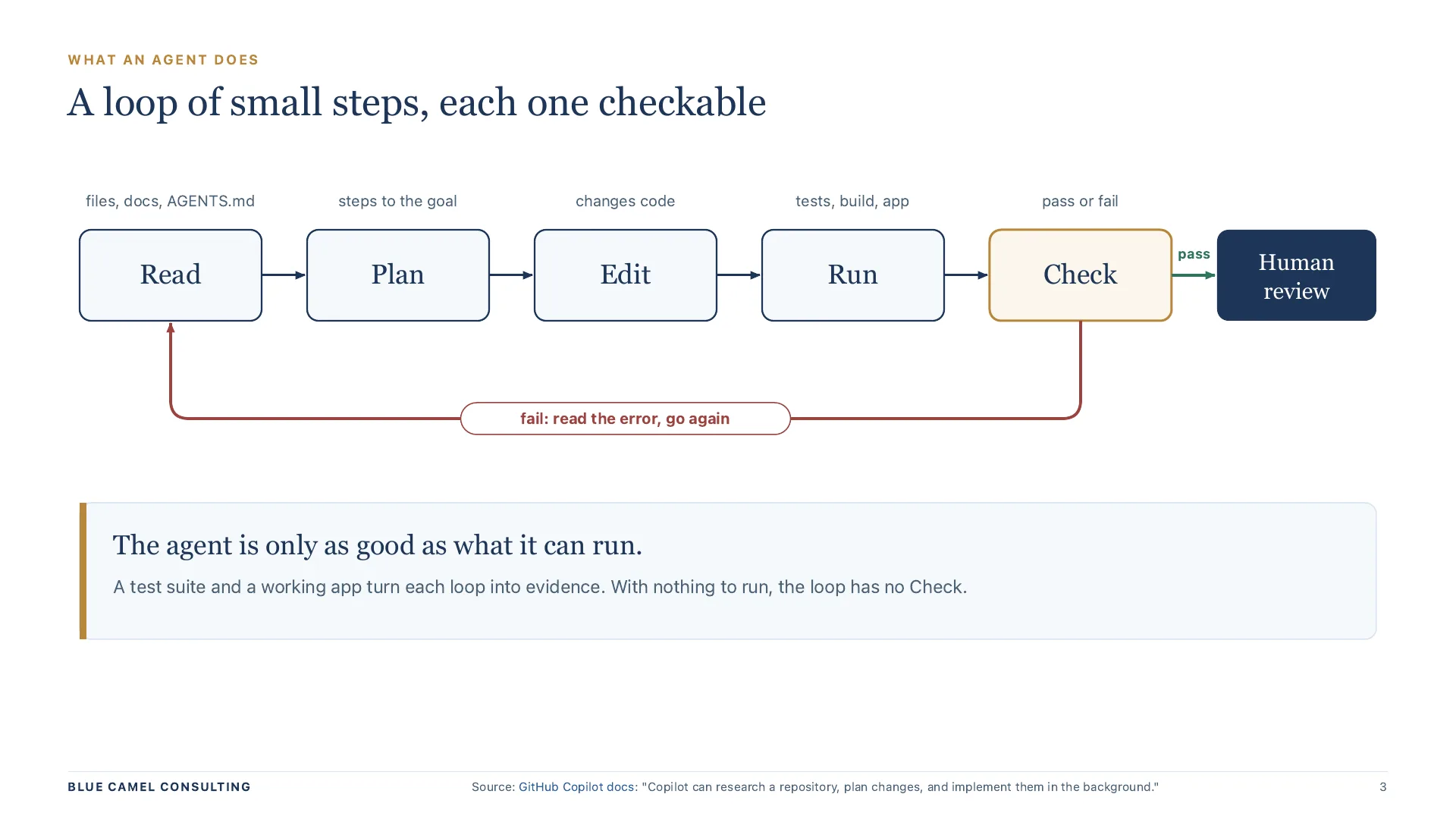
- Read files, docs, AGENTS.md
- Plan steps to the goal
- Edit changes code
- Run tests, build, app
- Check pass or fail
Pass: the work goes to a human for review. Fail: read the error, go again.
The agent is only as good as what it can run.
A test suite and a working app turn each loop into evidence. With nothing to run, the loop has no Check.
“Copilot can research a repository, plan changes, and implement them in the background.”
Strengths and limits
Where agents shine and where they slip
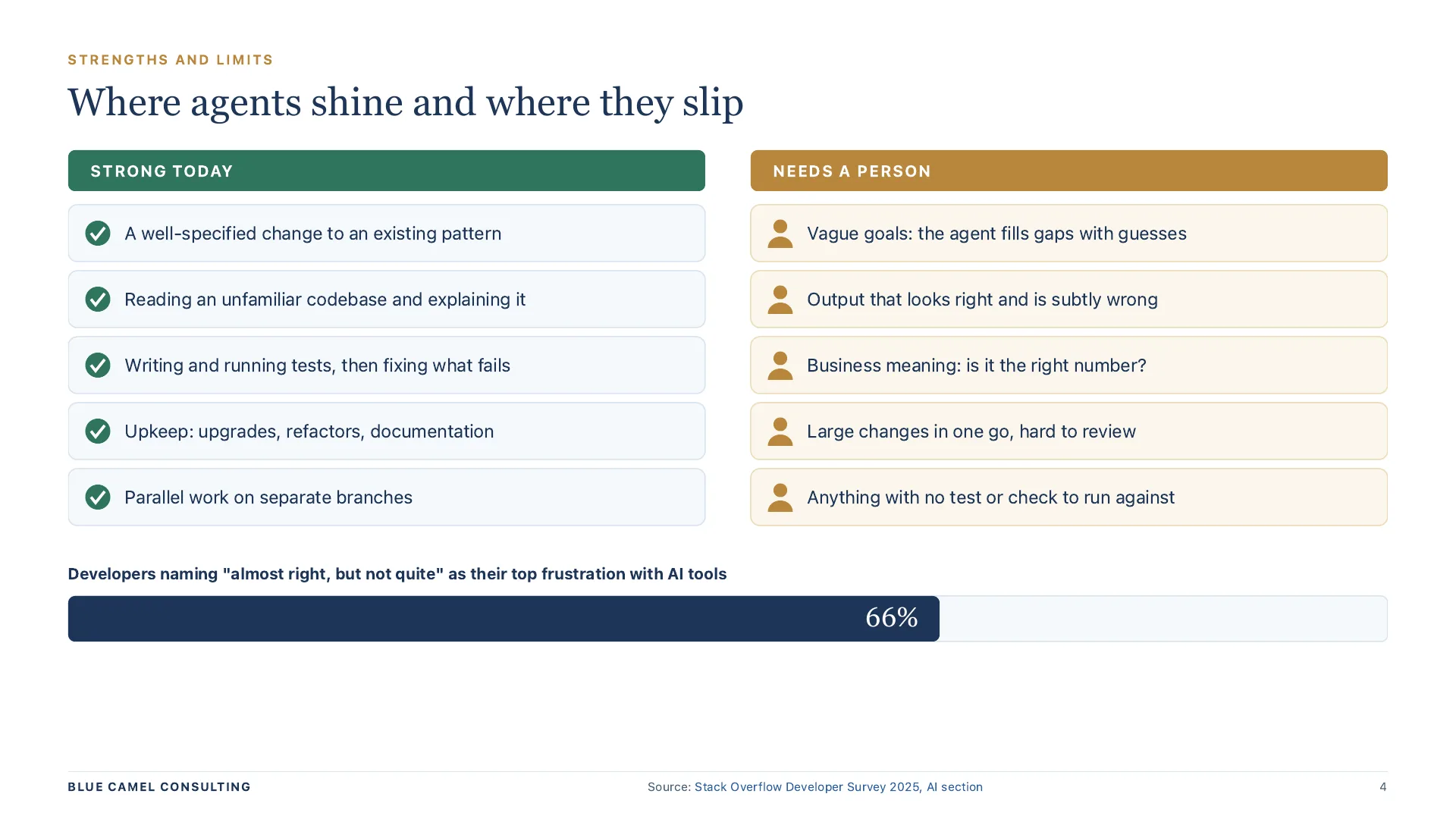
Strong today
- A well-specified change to an existing pattern
- Reading an unfamiliar codebase and explaining it
- Writing and running tests, then fixing what fails
- Upkeep: upgrades, refactors, documentation
- Parallel work on separate branches
Needs a person
- Vague goals: the agent fills gaps with guesses
- Output that looks right and is subtly wrong
- Business meaning: is it the right number?
- Large changes in one go, hard to review
- Anything with no test or check to run against
- 66% Developers naming “almost right, but not quite” as their top frustration with AI tools
The biggest gap
Most teams skip the contract, the test cases and the mock-up
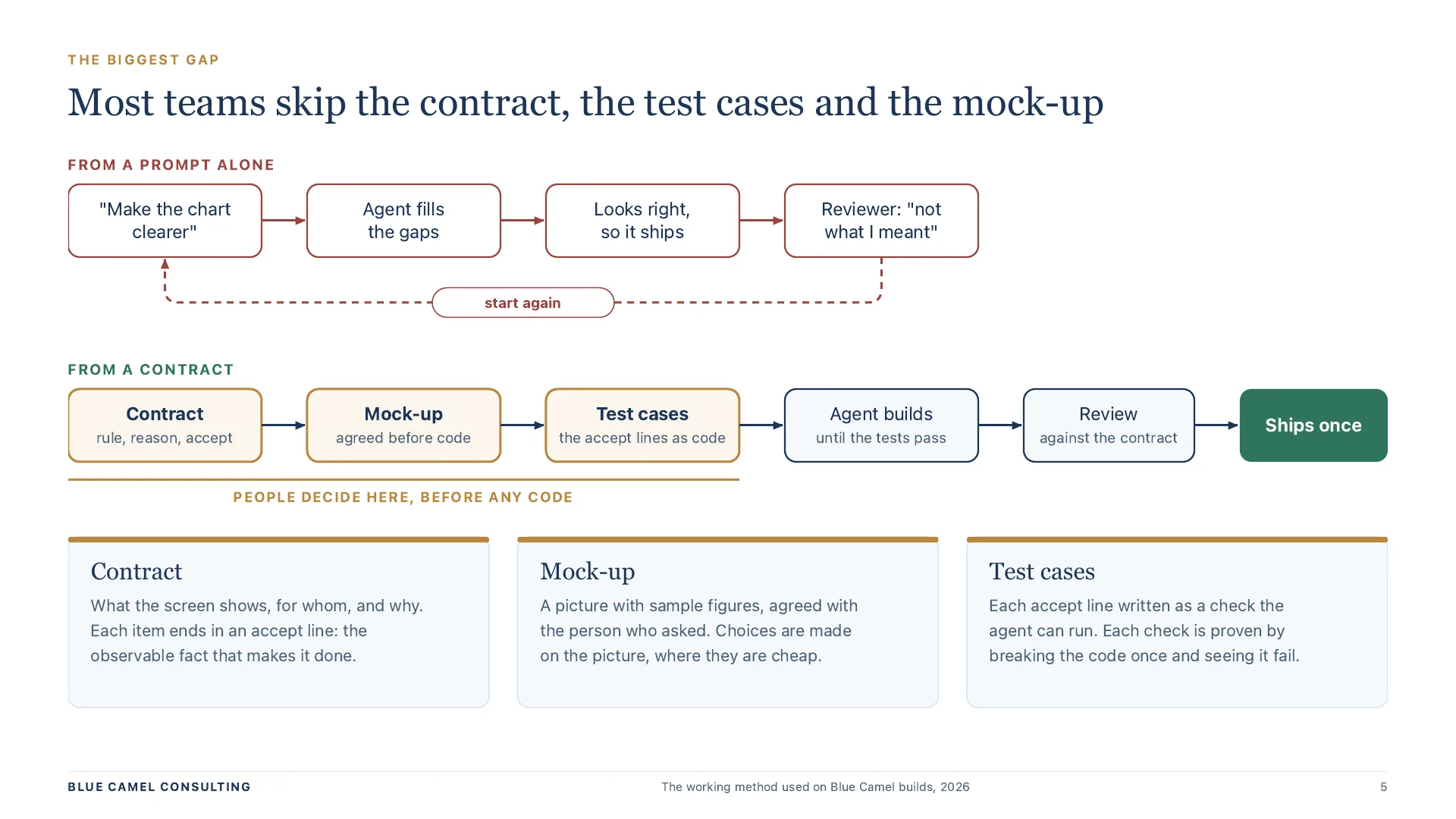
From a prompt alone
- “Make the chart clearer”
- Agent fills the gaps
- Looks right, so it ships
- Reviewer: “not what I meant”
Then start again.
From a contract
- Contract rule, reason, accept
- Mock-up agreed before code
- Test cases the accept lines as code
- Agent builds until the tests pass
- Review against the contract
- Ships once
People decide the first three steps, before any code.
- Contract What the screen shows, for whom, and why. Each item ends in an accept line: the observable fact that makes it done.
- Mock-up A picture with sample figures, agreed with the person who asked. Choices are made on the picture, where they are cheap.
- Test cases Each accept line written as a check the agent can run. Each check is proven by breaking the code once and seeing it fail.
The working method on Blue Camel builds.
A contract item, start to finish
One reviewer comment, carried from words to proof
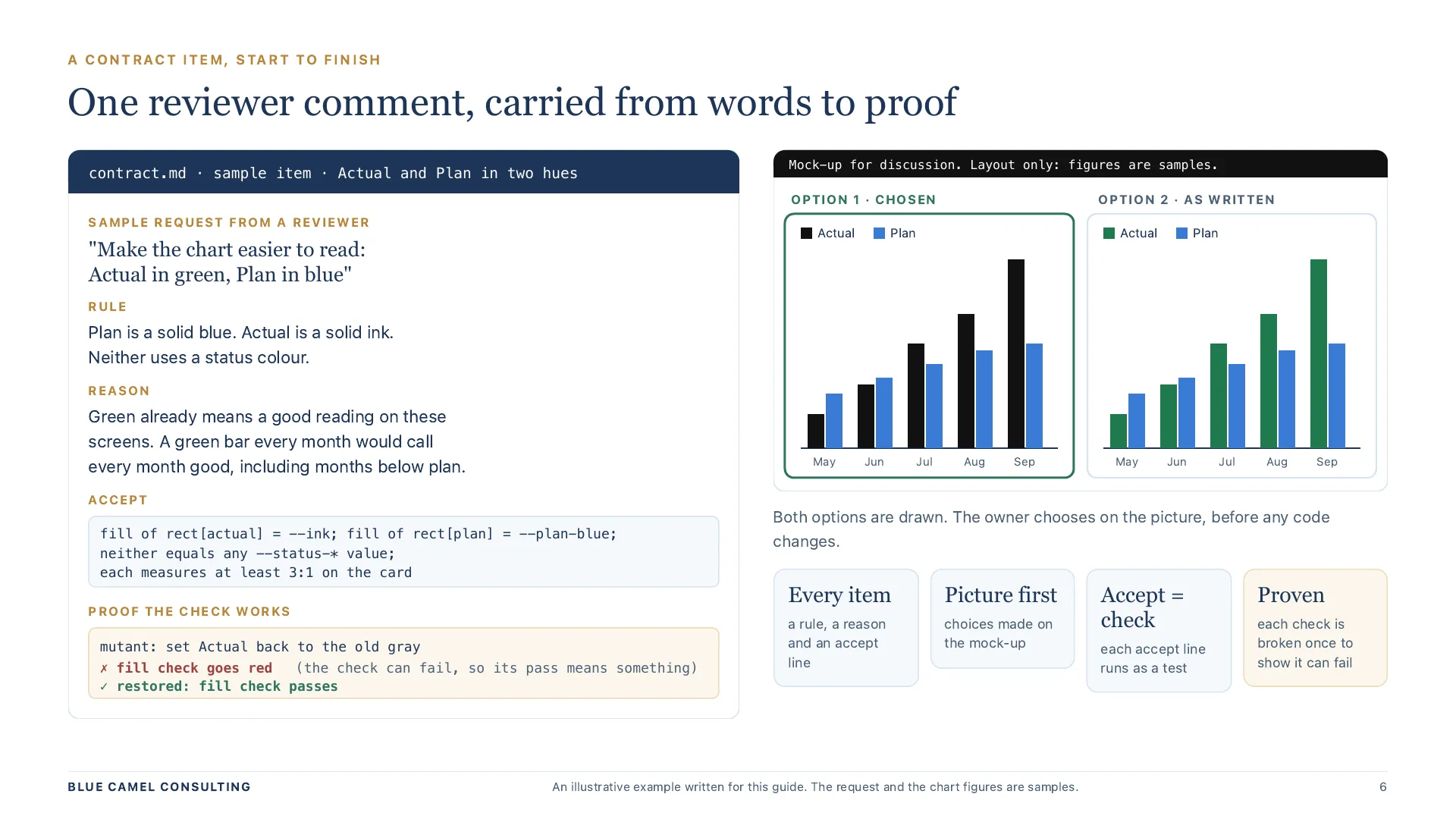
This example is written for the guide. The request and the chart figures are samples.
contract.md · sample item · Actual and Plan in two hues
- Request
- “Make the chart easier to read: Actual in green, Plan in blue” (a sample request from a reviewer)
- Rule
- Plan is a solid blue. Actual is a solid ink. Neither uses a status colour.
- Reason
- Green already means a good reading on these screens. A green bar every month would call every month good, including months below plan.
- Accept
- fill of rect[actual] = --ink; fill of rect[plan] = --plan-blue; neither equals any --status-* value; each measures at least 3:1 on the card
- Proof
- mutant: set Actual back to the old gray ✗ fill check goes red (the check can fail, so its pass means something). ✓ restored: fill check passes.
Mock-up for discussion
Layout only: figures are samples. Option 1 (chosen) draws Actual in ink and Plan in blue. Option 2 (as written) draws Actual in green. Both options are drawn. The owner chooses on the picture, before any code changes.
- Every item a rule, a reason and an accept line
- Picture first choices made on the mock-up
- Accept = check each accept line runs as a test
- Proven each check is broken once to show it can fail
The working method
Six habits that make agent output dependable
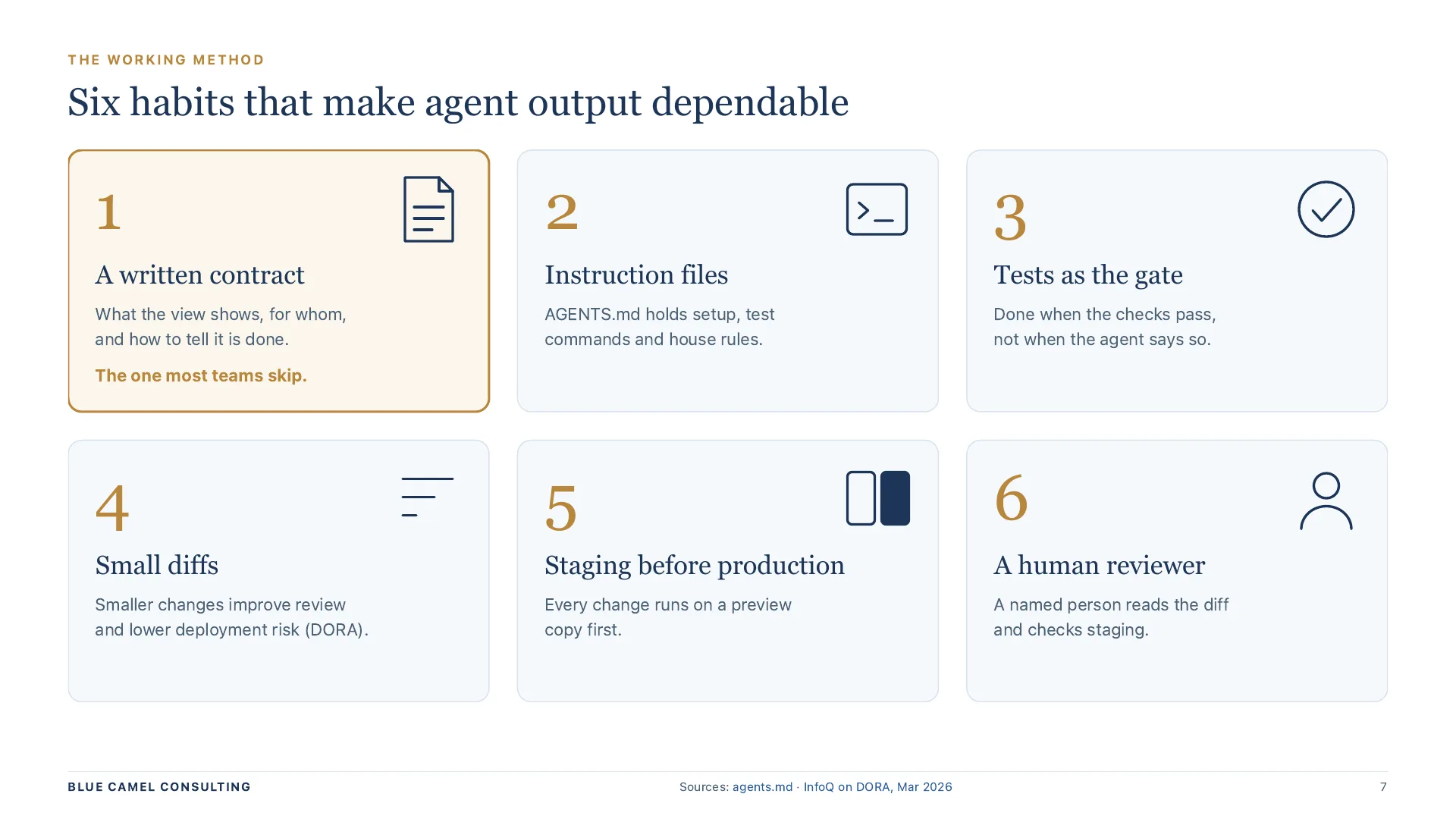
- A written contract What the view shows, for whom, and how to tell it is done. The one most teams skip.
- Instruction files AGENTS.md holds setup, test commands and house rules.
- Tests as the gate Done when the checks pass, not when the agent says so.
- Small diffs Smaller changes improve review and lower deployment risk (DORA report, via InfoQ).
- Staging before production Every change runs on a preview copy first.
- A human reviewer A named person reads the diff and checks staging.
Project files
What lives in the repository, and who reads it
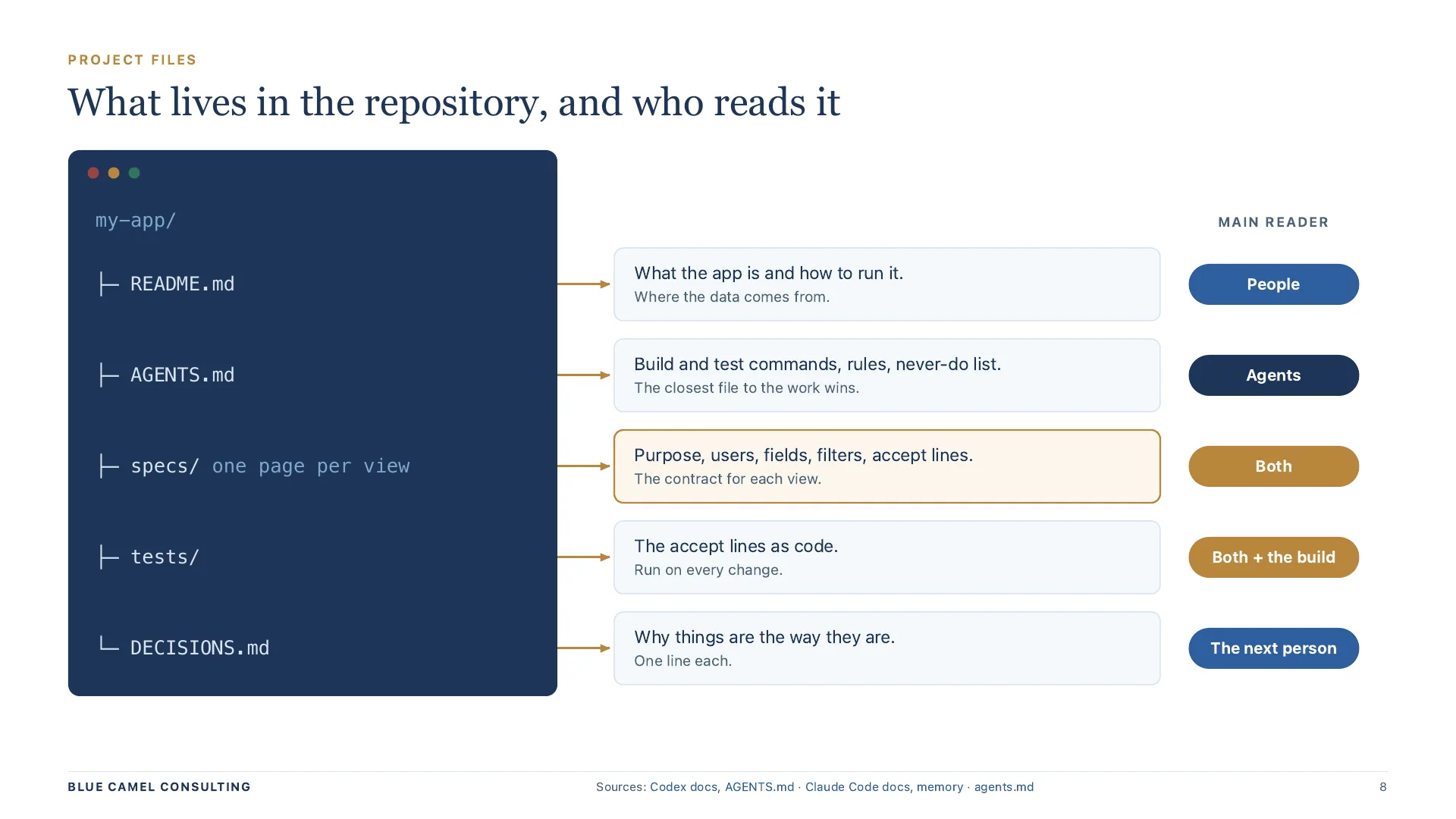
my-app/
- README.md What the app is and how to run it. Where the data comes from. Main reader: people.
- AGENTS.md Build and test commands, rules, never-do list. The closest file to the work wins. Main reader: agents.
- specs/ One page per view: purpose, users, fields, filters, accept lines. The contract for each view. Main reader: both.
- tests/ The accept lines as code. Run on every change. Main reader: both, and the build.
- DECISIONS.md Why things are the way they are. One line each. Main reader: the next person.
From a defined view to production
One path for every change
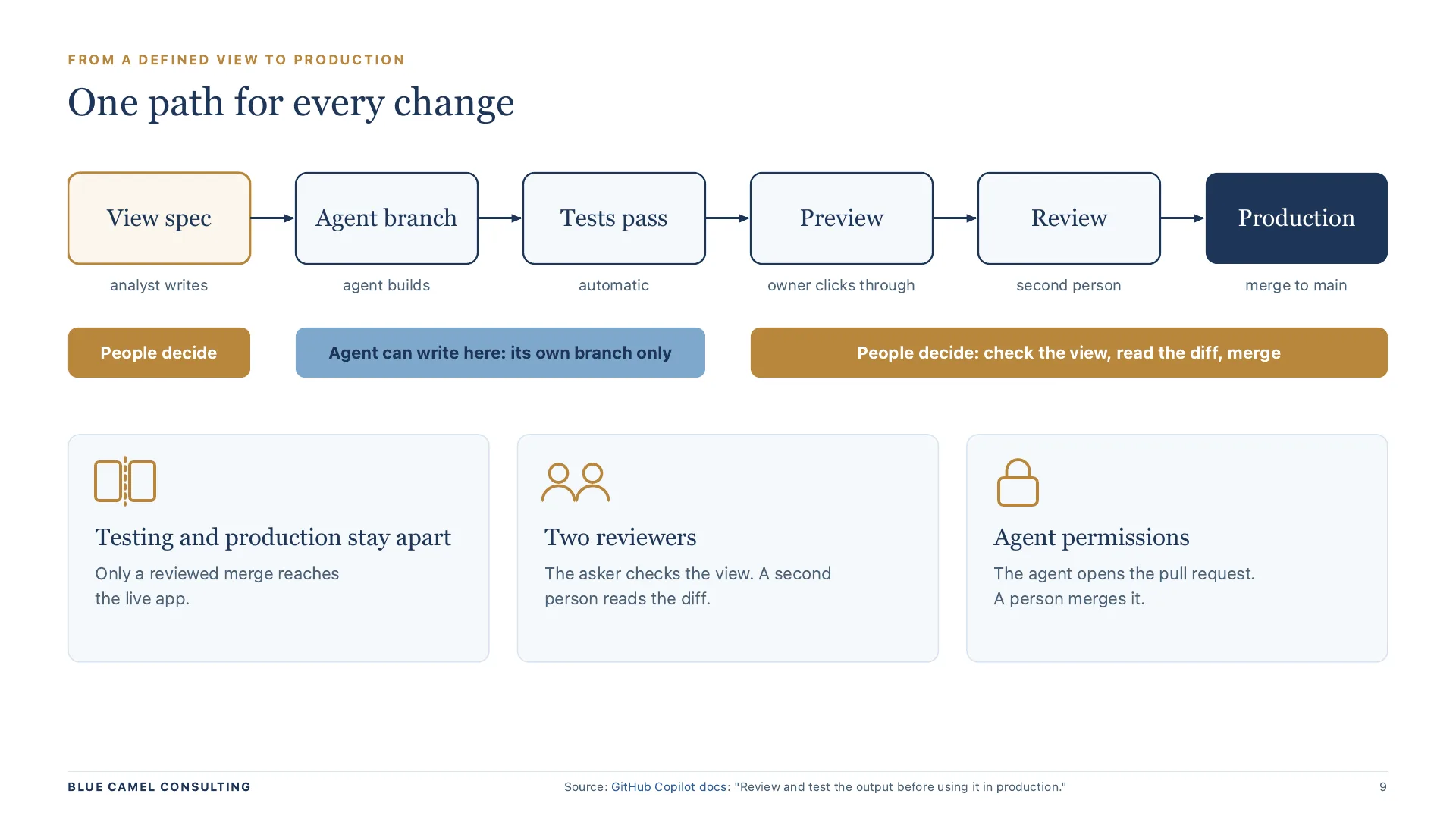
- View spec analyst writes
- Agent branch agent builds
- Tests pass automatic
- Preview owner clicks through
- Review second person
- Production merge to main
- People decide at the view spec.
- Agent can write here its own branch only (agent branch, tests pass).
- People decide check the view, read the diff, merge (preview, review, production).
- Testing and production stay apart Only a reviewed merge reaches the live app.
- Two reviewers The asker checks the view. A second person reads the diff.
- Agent permissions The agent opens the pull request. A person merges it.
“Review and test the output before using it in production.”
Taking over an AI-built app
What a team needs on day one
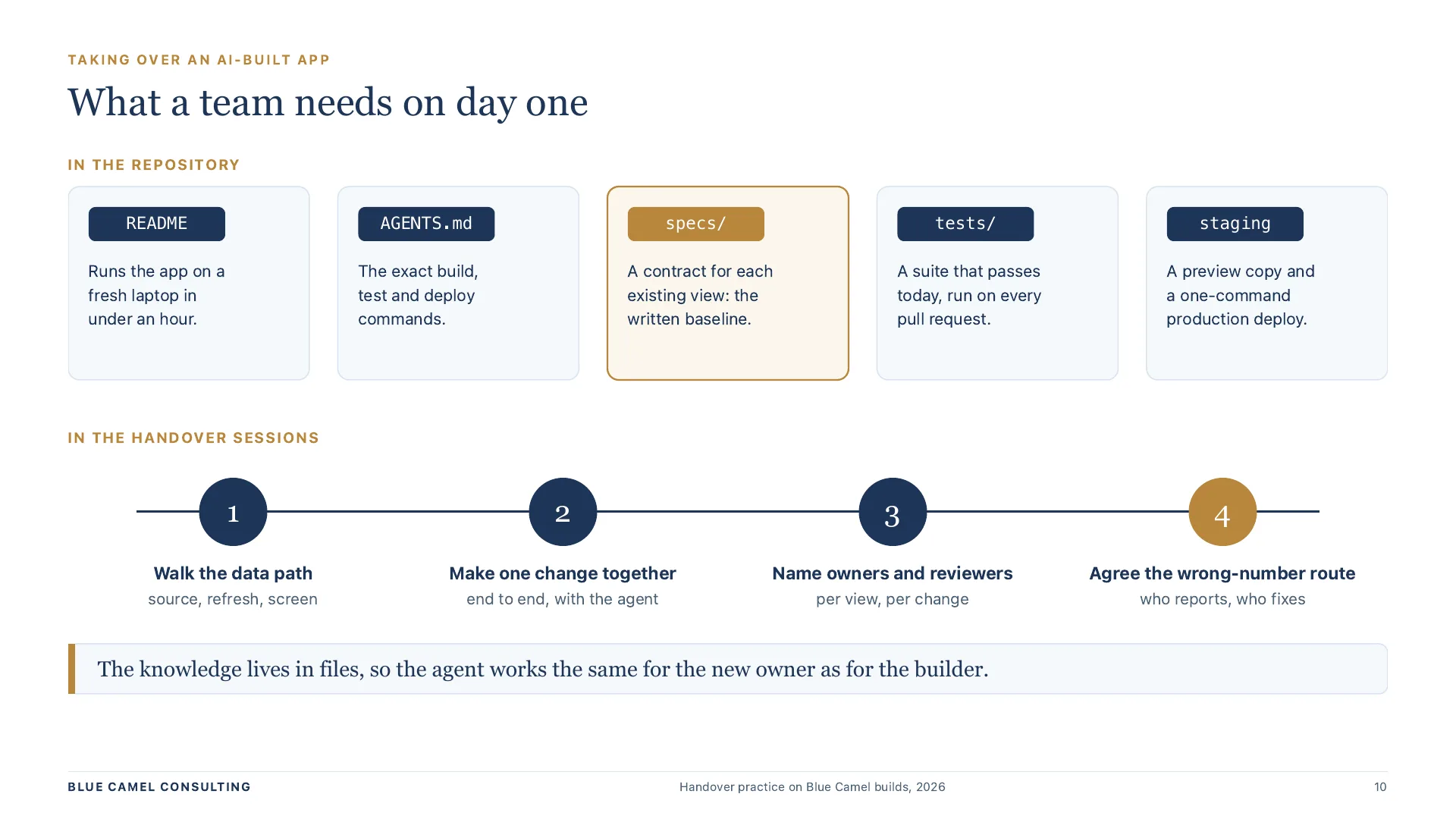
In the repository
- README Runs the app on a fresh laptop in under an hour.
- AGENTS.md The exact build, test and deploy commands.
- specs/ A contract for each existing view: the written baseline.
- tests/ A suite that passes today, run on every pull request.
- staging A preview copy and a one-command production deploy.
In the handover sessions
- Walk the data path source, refresh, screen
- Make one change together end to end, with the agent
- Name owners and reviewers per view, per change
- Agree the wrong-number route who reports, who fixes
The knowledge lives in files, so the agent works the same for the new owner as for the builder.
Handover practice on Blue Camel builds.
Judging trust
Trust the evidence, not the confidence
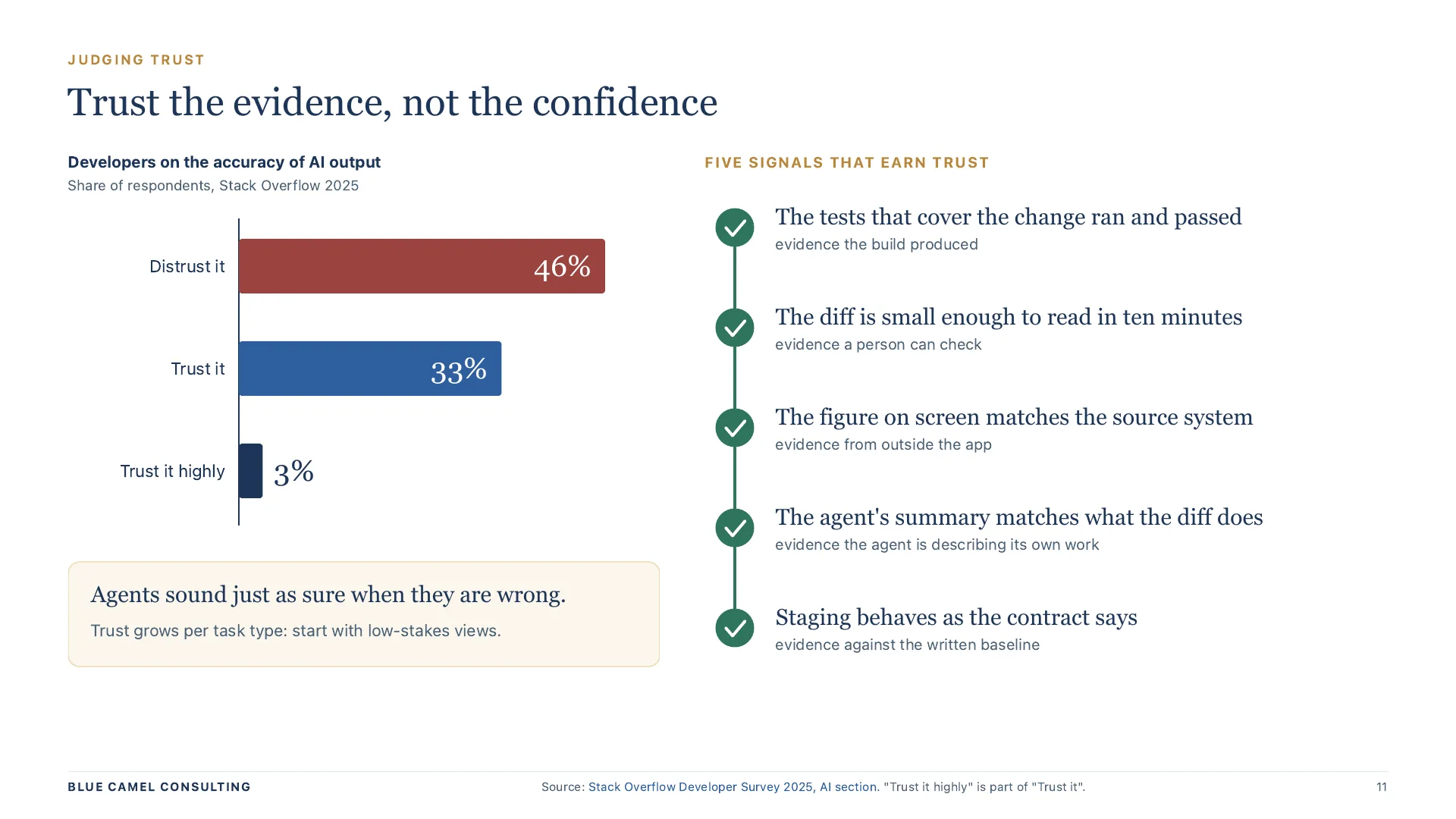
Developers on the accuracy of AI output
Share of respondents, Stack Overflow 2025.
- Distrust it 46%
- Trust it 33%
- Trust it highly 3%
“Trust it highly” is part of “Trust it”.
Agents sound just as sure when they are wrong. Trust grows per task type: start with low-stakes views.
Five signals that earn trust
- The tests that cover the change ran and passed evidence the build produced
- The diff is small enough to read in ten minutes evidence a person can check
- The figure on screen matches the source system evidence from outside the app
- The agent’s summary matches what the diff does evidence the agent is describing its own work
- Staging behaves as the contract says evidence against the written baseline
Memory and autonomy
What the model retains, and how far it acts alone
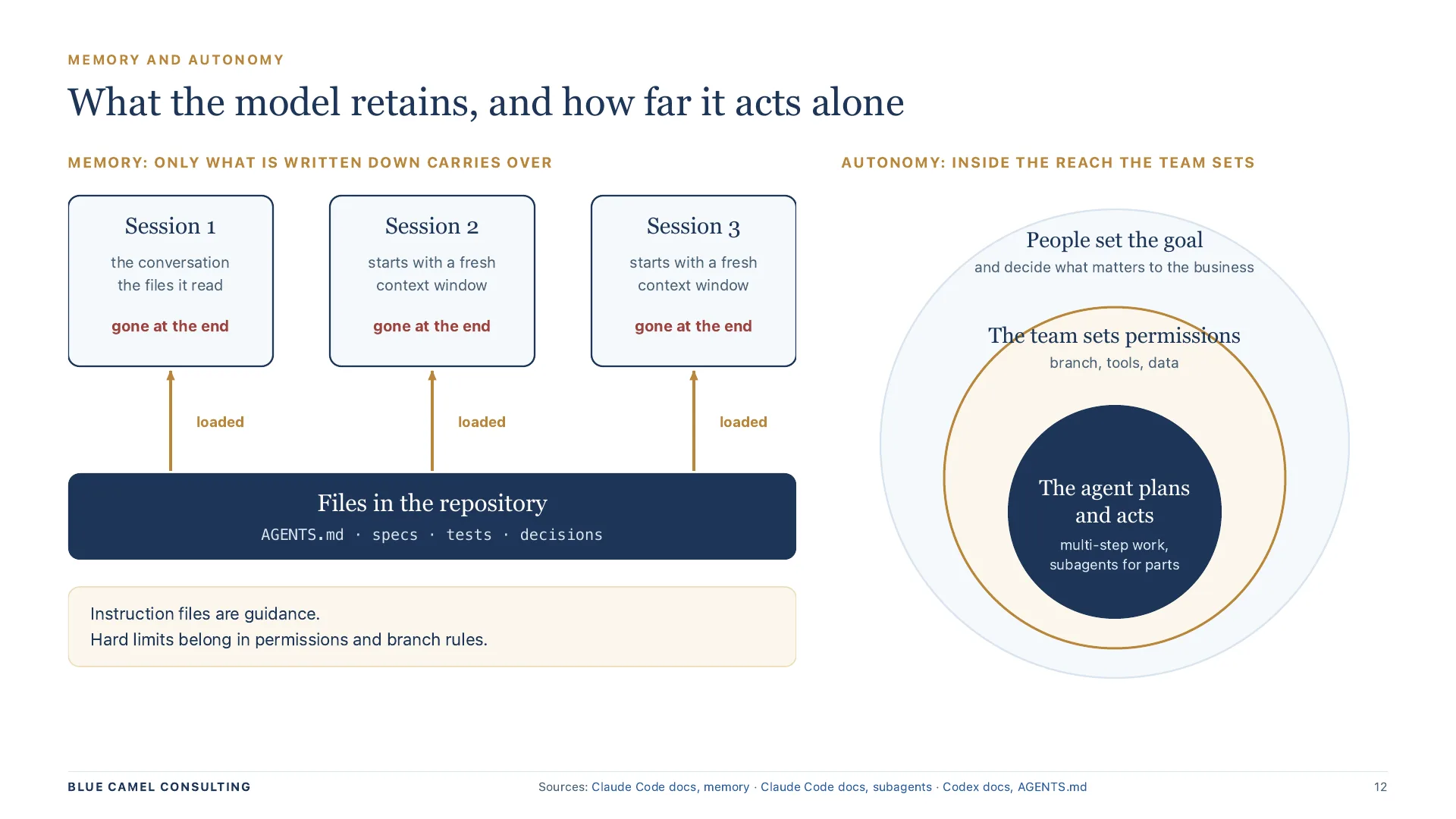
Memory: only what is written down carries over
- Session 1 the conversation, the files it read. Gone at the end.
- Session 2 starts with a fresh context window. Gone at the end.
- Session 3 starts with a fresh context window. Gone at the end.
Files in the repository are loaded into each session: AGENTS.md, specs, tests, decisions.
Instruction files are guidance. Hard limits belong in permissions and branch rules.
Autonomy: inside the reach the team sets
- People set the goal and decide what matters to the business
- The team sets permissions branch, tools, data
- The agent plans and acts multi-step work, subagents for parts
A suggested 30-day start
Four weeks to a team that ships changes safely
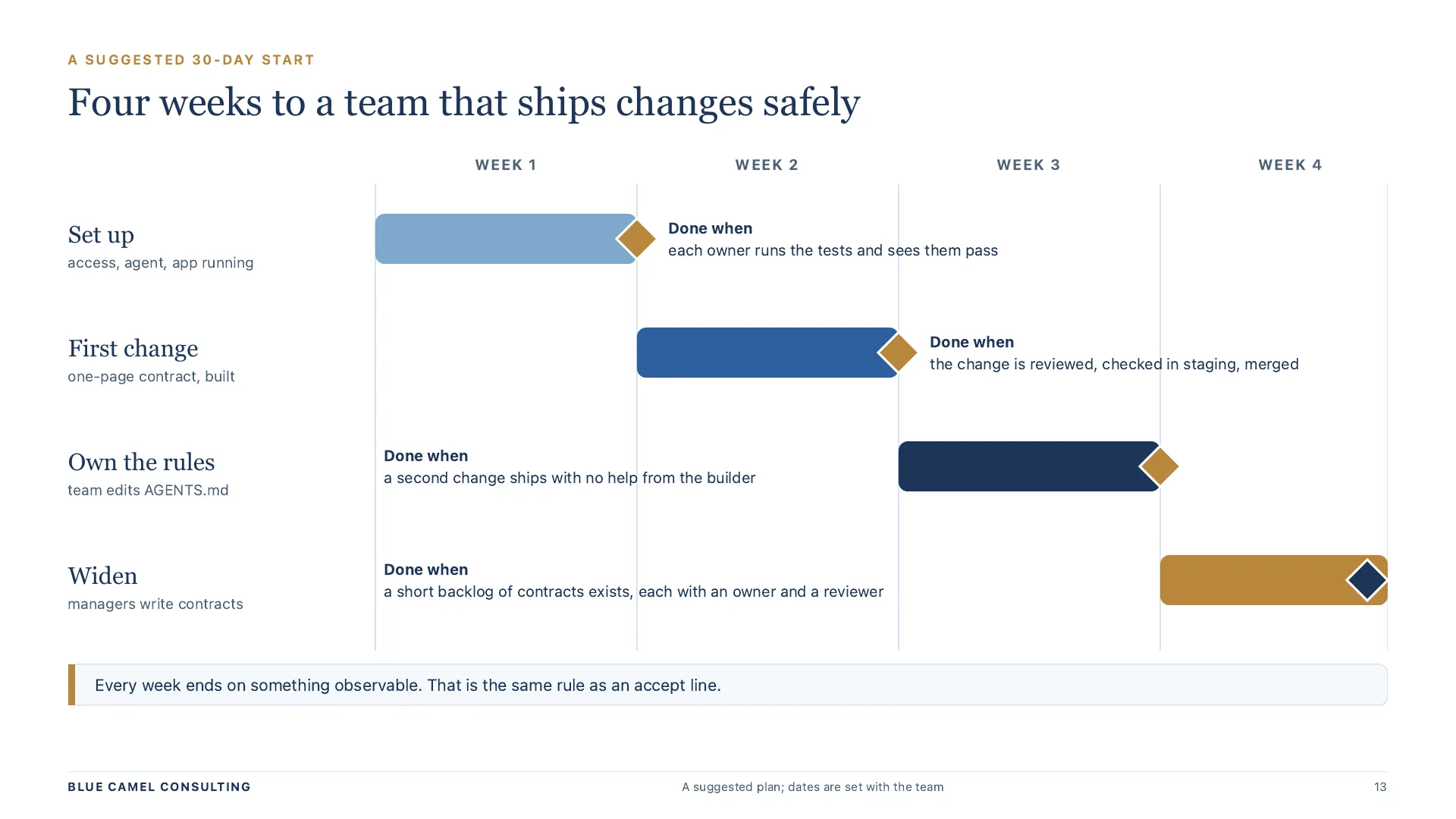
- Week 1: Set up access, agent, app running. Done when each owner runs the tests and sees them pass.
- Week 2: First change one-page contract, built. Done when the change is reviewed, checked in staging, merged.
- Week 3: Own the rules team edits AGENTS.md. Done when a second change ships with no help from the builder.
- Week 4: Widen managers write contracts. Done when a short backlog of contracts exists, each with an owner and a reviewer.
Every week ends on something observable. That is the same rule as an accept line.
A suggested plan; dates are set with the team.
Start a conversation
Blue Camel Consulting builds with coding agents under this method, then hands the app, its contracts and its tests to the owning team. Start with one view and one contract. Write to [email protected].